
Preparing a supplier order means checking stock, comparing needs and reviewing quantities. A person often moves between screens before submitting a proposal.
An agent can prepare that work. An interface remains useful for reviewing the lines and confirming the purchase. The product should let people switch between the two while keeping the current record.
MCP Apps and WebMCP offer different ways to connect a request to an action, in internal tools and customer services alike.
One task, several interfaces
In a conventional interface, the person selects filters and fills in fields. With an agent, they describe their goal and let the software prepare the steps. They can then check a detail manually.
These modes can coexist. A table helps compare rows. A conversation helps express a request. A calendar makes it easier to choose a time slot.
These access methods should share data and business rules, without making people enter the request again in a form.
Clément Bouly's presentation brings together four complementary approaches. They are not a sequence of replacements. Within a single journey, a request can start in the assistant and finish in a visual interface.
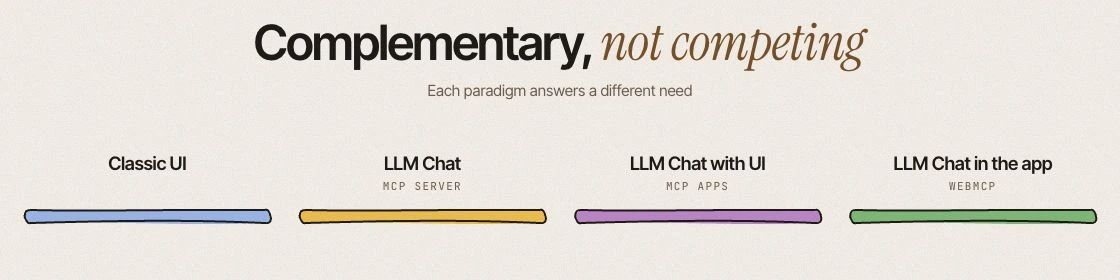
What MCP, MCP Apps and WebMCP connect
An MCP server exposes data and tools to an AI application, for checking stock or preparing an order.
MCP Apps adds an interactive interface supplied by the MCP server. A compatible host displays it inside the assistant, for reviewing proposal lines, for example. Support depends on the host.
WebMCP lets an open page declare functions that an agent can use in the browser. The agent acts on the website, within its current context.
As of 6 October 2026, Chrome offers a WebMCP origin trial from version 149. The draft specification remains experimental. It is neither a W3C Standard nor on the W3C Standards Track.
An assistant embedded in your application is another option. It can use your APIs and business rules without WebMCP. Displaying a chat on a page does not mean that the page exposes functions to external agents.
| Mode | Where to act | Which task |
|---|---|---|
| Direct interface | In the product | Explore, compare, enter data |
| Embedded assistant | In the product | Get guidance on the open record |
| MCP server | From an AI application | Read data, call a tool |
| MCP Apps | In a compatible assistant | Review and adjust visually |
| WebMCP | On the open page | Ask an agent to perform a site action |
This table helps choose an access method, rather than rank products by maturity. A simple booking can remain a form. A purchase with many items can combine agent preparation with a table for review.
Preparing a purchase in an internal tool
Imagine a team that needs to restock a workshop. They request a proposal for the following week. The agent checks permitted stock data, pending orders and expected needs, then prepares the purchase lines.
The person sees the references, quantities and reasons for each choice. They adjust a line to account for an expected delivery. This review can take place in the business tool or in a compatible MCP App.
The preparation remains a draft. Sending the order requires confirmation showing the supplier, amount and selected items. The server checks permissions and purchasing rules before recording it.
If a reference is missing or a quantity exceeds a threshold, the product explains the blocker and lets the person correct the proposal.
Changing a booking in a customer service
In another illustrative scenario, a person wants to move their booking to Friday. They can browse the calendar or ask their agent to search on a WebMCP-compatible page.
The service displays available slots and any fees. The person can take over the calendar to compare two times without starting their request again.
Before confirming the change, they see the selected date, price and effect on their current booking. After the action, the status distinguishes a completed change from a pending or rejected request.
This self-service journey remains available through buttons. The agent adds an access method, with the same conditions and server-side checks.
Embedding an assistant in your own product
An embedded assistant guides people through the record on screen, within your product. An external assistant can instead coordinate a request across services. The choice depends on the context the task needs.
The integration can use existing APIs. WebMCP instead makes page functions available to a browser agent, which must visit the website to discover them.
A narrowly scoped product can offer its complete workflow inside a compatible assistant through MCP Apps. A fuller interface remains useful for exploration or complex journeys.
We discuss this distribution in our article on ChatGPT plugins.
Making actions and effects visible
A function should be understandable to the person and the agent. Its name, parameters and limits should explain what it can do. A tool named simply "process" leaves too much room for interpretation.
The interface shows changes, errors and possible next steps. It lets people take over a proposal manually. After an interruption, they should know whether the operation happened before trying again.
Permissions and server-side authorization remain necessary. A natural-language request grants no additional rights. Confirmation should concern an actual consequence, such as purchasing or moving a booking.
Preparation, viewing and comparison can remain fluid. Confirmation concerns the commitment, rather than every filter.
Choosing and measuring a first journey
Choose a bounded task with a verifiable result. Determine where the person needs to look, decide or correct to choose between a conventional interface, an embedded assistant and external access.
Measure completed tasks, time taken and corrections. Observe abandoned tasks and returns to the manual journey. A demonstration alone cannot establish a benefit in use.
At Appik, we scope this first trial around the journey and existing systems.
After Silicon Chalet
I attended Silicon Chalet SC70 on 6 October 2026 at Digicomp in Lausanne. Clément Bouly's presentation informed this reflection. He works at PAVE Space in Villeneuve.
His slides compare Vanilla, MCP, MCP Apps and WebMCP. Andreea-Carina Deaconu spoke about cyber risk prioritization.
Thank you to Sébastien Pittet and Mario Mikojevic for organizing, Exoscale for the food and drinks, and Digicomp for hosting and providing prizes.



 Swiss Made Software
